How evolutionary hyperparameter optimization works
Reinforcement learning is picky about hyperparameters. Sample efficiency is low compared with supervised learning, so a bad learning rate or batch size can waste hours of GPU time. Grid search and sequential Bayesian tuning usually mean many separate training runs before you find settings that work.
Arena’s optional HPO step runs evolutionary search inside a single training job: a population of agents shares experience, is scored on fitness, and is refined with tournament selection and mutations. You turn it on in the wizard (defaults are on for classic RL) and can adjust mutation probabilities on a live run from the Experiments tab.
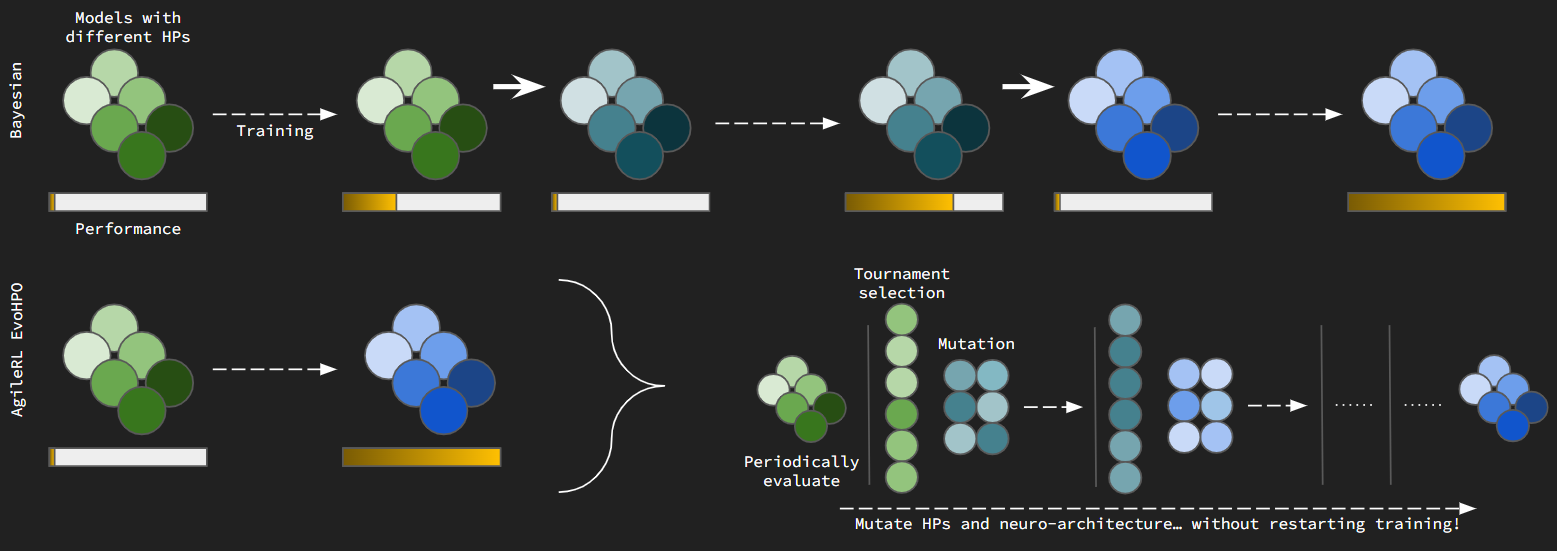
Evolutionary HPO in one training run: evaluate the population, select survivors, mutate offspring, then continue learning.
Why evolution fits RL
A population of agents can act in the same environment and learn from shared rollouts. After each evaluation cycle, you compare fitness without starting a brand-new experiment for every hyperparameter guess. Promising agents survive; their copies are mutated to try new network shapes and learning hyperparameters. Over time the population drifts toward settings that score well on your task.
That differs from Bayesian or grid search, which typically launch one run per trial. Evolutionary HPO trades extra agents per run for fewer total runs to reach strong performance.
What happens each generation
Train and evaluate — Agents in the population learn from shared experience, then are scored (fitness is separate from the training score you see on learning curves).
Tournament selection — Small random subsets compete; winners join the next generation. With elitism, the best agent is always kept.
Mutation — Survivors are cloned and changed under probabilities you set: no change, architecture changes (layers or nodes), weight noise, activation changes, or RL hyperparameter tweaks (learning rate, batch size, and similar).
Repeat — The loop runs at the cadence you set on the HPO step (by steps, batches, or episodes).
Tournament selection and mutations run back-to-back between evaluation cycles.
What you can mutate
Category |
What changes |
|---|---|
None |
Agent unchanged for that slot |
Architecture |
Add or remove layers or nodes; useful weights are kept where possible |
Network parameters |
Gaussian noise on a subset of weights |
Activation |
Swap activation layers |
RL hyperparameters |
Algorithm knobs such as learning rate or batch size within configured bounds |
Arena exposes these as probabilities on the HPO step (Evolution, Tournament Selection, Mutation accordions). Field-level help is on the info icons next to each control.
Configure and monitor in Arena
Before training: HPO step in the experiment wizard.
During a run: Experiments tab → row menu (⋮) → Update mutation parameters while status is Running.
After training: On the project Results tab, open Hyperparameter and Network Optimization Charts when HPO was enabled, or select a single run to compare agents in the population on default training charts.
To pause evolution without stopping the job, set every mutation probability to 0 except None.