Bring your own compute
Enterprise only
The Bring your own compute (BYOC) page is available only on Enterprise organizations. See Plan permissions.
Connect Kubernetes to Arena: a cluster you already run (self-managed, EKS, GKE, or similar), or a Nebius cluster you create with the Arena CLI. Org Admins on Enterprise orgs open Bring your own compute from the profile menu to register a cluster and manage resource classes.
The page has two sections: BYOC resource provider, then BYOC clusters. The provider is Self-managed Kubernetes and Arena turns it on when the page loads, so there is nothing to switch on by hand. Expand a cluster row to see and manage the resource classes that run on it.
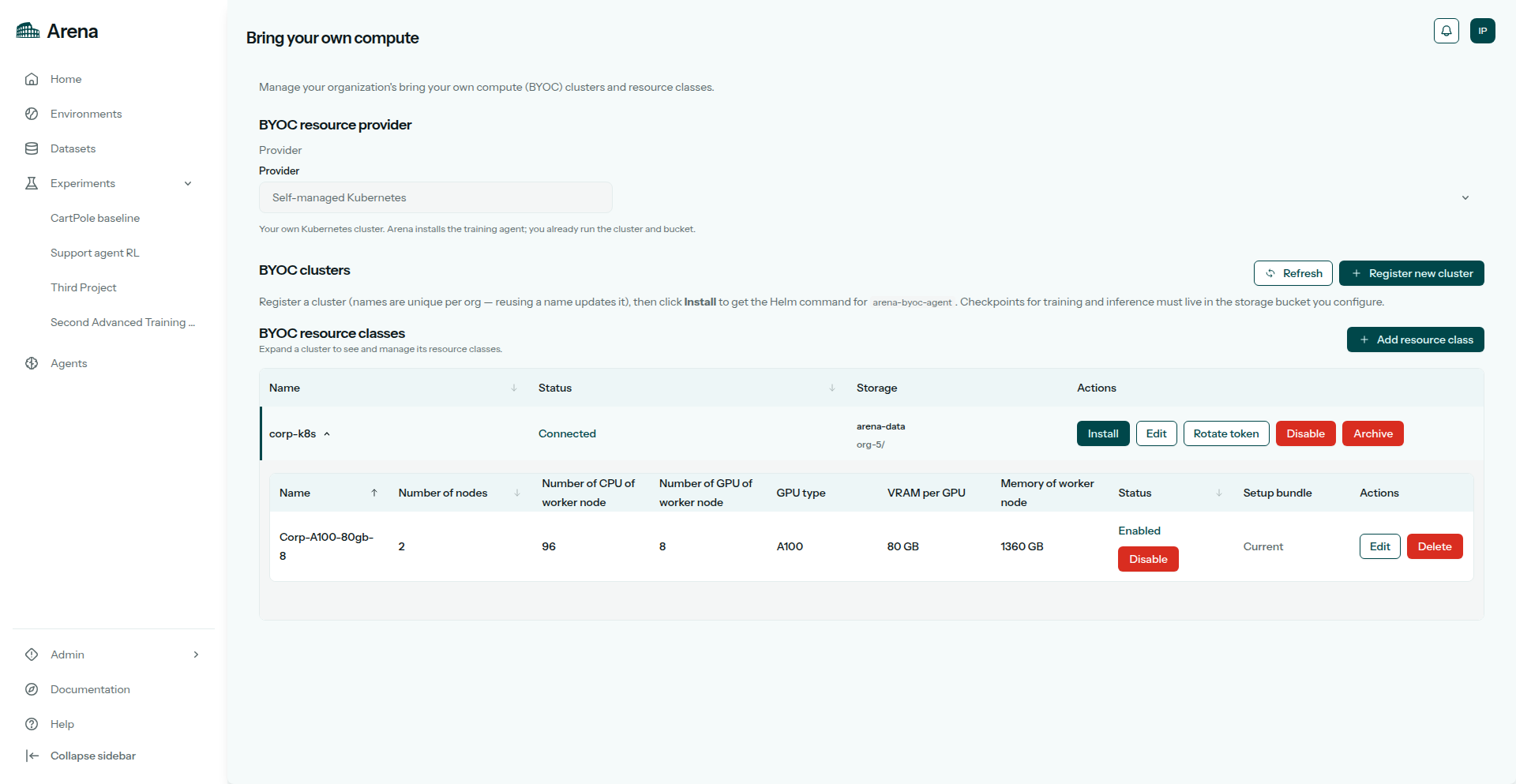
BYOC clusters with one cluster expanded to show its resource classes.
Prerequisites
Before you start, have:
Enterprise plan on the current organization
Org Admin role
kubectlaccess to the cluster you will install into (for Custom, that cluster already exists)An S3-compatible bucket the cluster can reach
A Kubernetes Secret in the agent namespace (
arena) holding that bucket’s credentialsArena CLI installed (
pip install "agilerl[arena]") andarena loginto run the generated install or provision commandTo provision a Kubernetes cluster (
arena cluster provision):terraformand the Brev CLI (brev) on yourPATH
Steps
1. Register your cluster
Click Register new cluster. The form title is Register BYOC cluster. Cloud provider is Custom or Nebius; on edit the field is disabled, so the provider stays fixed after you register.
Nebius is the only cloud Arena can create a cluster on, and that creation runs through the Arena CLI, not the web app. For Custom, you bring a Kubernetes cluster you already run; Arena installs the training agent into it.
For Nebius, the form asks for Tenant ID (required), Region (required), Project ID, Storage project ID, and Subnet ID. Help under Project ID: “Optional. Leave empty to create a project in this region.” Help under Storage project ID: “Optional. Durable project for object storage and Terraform state. Leave empty to create one.”
For Custom, the form asks for storage as well:
Field |
Example |
|---|---|
Name |
|
Storage endpoint |
|
Storage bucket |
|
Storage secret name |
|
Nebius clusters do not show those three fields. Arena derives the endpoint from the region, names the bucket <cluster name>-data, and expects a Secret called storage.
For Custom, create the credentials Secret in the agent namespace first if it does not exist:
kubectl create secret generic arena-storage -n arena \
  --from-literal=AWS_ACCESS_KEY_ID=<key> \
  --from-literal=AWS_SECRET_ACCESS_KEY=<secret>
Cluster names are unique per org. Reusing a name updates that cluster instead of creating a duplicate.
Optional routing and storage settings sit under Advanced: Storage prefix, Domain, Hostname template, TLS secret name, Gateway name (with Gateway namespace and Section name), Ingress class name, Ray data storage class, Ray data PVC size, and Preprocessing resource class. Hostname template is hostname-only (inference-{deploymentId}). An empty hostname template with a domain set defaults to inference-{deploymentId}. Arena joins them as {expanded_hostname_template}.{domain} when both are set.
Inference domain and DNS
Arena prefills Domain as {cluster}-{org}.byoc.agilerl.com. Keep that value and you do not have to touch DNS. Once a routing Gateway or mapped Ingress controller Service has an address, the agent reports it and Arena publishes wildcard A / AAAA records so every hostname under *.{domain} resolves to it — with or without an inference deployment. The records track what the agent reports and are removed when you disable or archive the cluster.
If you route with Ingress rather than Gateway API, tell the agent which Service fronts your Ingress class name by setting routing.ingressControllers in the agent Helm values — otherwise there is no address to publish.
Type your own domain instead (for example corp.example.com) and Arena keeps it exactly as entered. It publishes no records in byoc.agilerl.com, so point *.{your domain} at your ingress load balancer yourself. Clearing both Domain and Hostname template skips inference DNS altogether.
TLS for the Arena-managed domain
Keep the prefilled domain and Arena issues a wildcard certificate for it. The agent copies the keypair into your cluster as a kubernetes.io/tls Secret; the generated HTTPS Gateway uses that Secret. Certificate renewal is automatic. You do not rotate the Secret or recreate the Gateway.
If you type your own domain, set TLS secret name to a Secret you manage. Arena does not issue or refresh that certificate.
2. Install the agent
Registering a new cluster opens the install handoff straight away. If you reused a name and updated an existing cluster, click Install on its row instead. Three ways to install:
Option |
What you get |
|---|---|
Arena CLI (default) |
A generated |
Install with Helm instead |
Expand this panel for the Helm commands, |
Install package |
Download install package (.tar.gz) in the same panel gives you |
For Nebius, the panel tells you to provision the Kubernetes cluster first: download the spec file, run the provision command on a machine with Nebius credentials, then install the agent. You can also skip the UI form and do everything from the terminal with arena cluster provision nebius … --register-and-install — see BYOC CLI.
Once the agent polls Arena, the cluster row shows Connected. Degraded means heartbeats stopped.
Later changes live on the cluster row: Install (regenerate files), Issue token or Rotate token, Edit, Disable, and Archive. A disabled cluster shows Restore instead; after restoring, issue a new agent token. Disable revokes active cluster tokens and stops training and inference on linked classes from reconciling. Archive removes the cluster from the table and archives the classes bound to it.
3. Add resource classes
Expand the cluster row, then click Add resource class above its class table. The form opens with that cluster chosen in Enterprise cluster. On a disabled cluster the button is disabled with the hint “Enable this cluster before adding a resource class.”
Add resource class in the BYOC clusters header works too. It is disabled until at least one cluster is enabled, with the hint “Register an enabled enterprise cluster before adding a resource class.” With two or more enabled clusters, that button leaves Enterprise cluster for you to pick. Refresh reloads clusters and classes.
Fields are described in Resource classes.
The cluster agent provisions Ray for each class, so there is no per-class install step and no per-class download.
Deleting a class
Delete opens a confirmation dialog naming the class. Deletion cannot be undone and removes the class from Arena; clean up any leftover stack on your side separately.
Hiding classes without deleting them
There is no provider off switch. To keep classes out of new experiment runs:
Disable the class in the Status column — the row stays in the table.
Disable the cluster to stop all of its classes at once.
Archive the cluster when you are done with it.
Access
Bring your own compute appears in the profile menu only for org Admins on Enterprise orgs.
Members on Enterprise orgs do not see the menu item. They can still pick BYOC classes on Resources once an Admin has configured them.
Registering, installing, and editing clusters requires an org Admin on an Enterprise org.